An Oracle APEX item plug-in for picking a Font APEX icon, on a page item or an Interactive Grid column.
A demo application is available on oracleapex.com
https://oracleapex.com/ords/f?p=94650
Sign in with demo / demo.
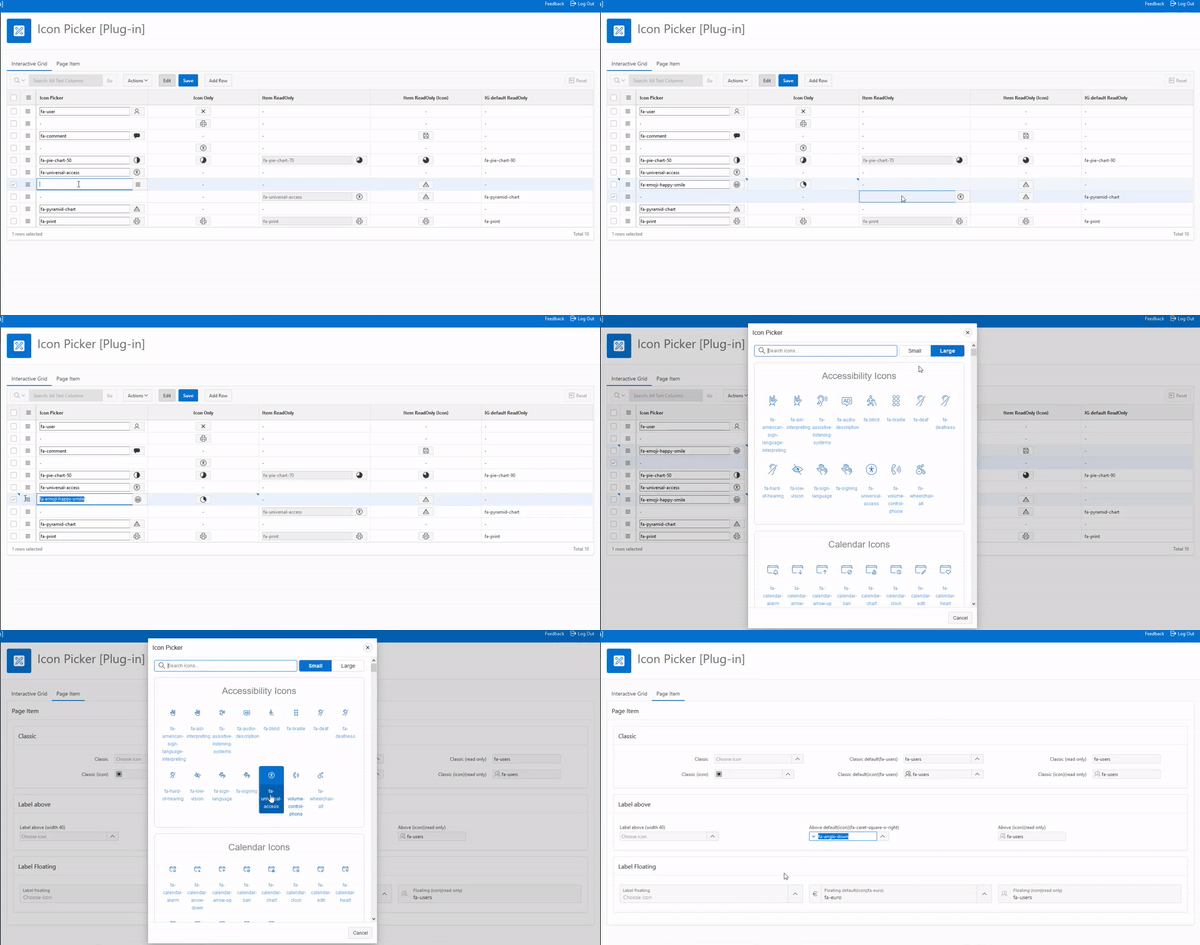
- Import
plug-in/item_type_plugin_si_abakus_iconpicker_apex_232.sqlinto your application. - Add an item on a page, or a column to an Interactive Grid.
- Choose IconPicker [Plug-in] as the item type.
- Save. IconPicker is ready to use.
- Please leave some feedback. Thanks!
Upgrading from 2.0 keeps every attribute you already configured - the plug-in and attribute IDs are unchanged, so the import replaces 2.0 in place. Every icon 2.0 shipped still exists in Font APEX 2.5.1, so no stored value is orphaned.
Running APEX 22.1 to 23.1? Import item_type_plugin_si_abakus_iconpicker_apex_221.sql
(version 2.0) instead. For 18.1 to 21.2, use ..._apex_181.sql (version 1.5).
- Font APEX 2.5.1, the icon set that ships with APEX 26.1: 1,541 icons across 24
categories, up from 1,262. New
AI,BUSINESS,CONSTRUCTIONandCOUNTRY_FLAG(253 flags) categories, plus Oracle'sNEWgroup. - The picker adapts to your APEX release. On first open it reads the instance's own
Font APEX stylesheet and drops icons that release does not have, adds ones it does not
know about under
OTHER, and removes any category left empty. On APEX 23.2 the four new categories above disappear instead of rendering as blank tiles. See The picker only offers icons your APEX release actually has. - Category tabs above the grid, so a 1,500 icon list narrows to one category in a click. Tabs and search compose. (ToDo item from 2.0.)
- Blacklist icons or whole categories, at application level, at item level, or both — the two lists are combined. Accepts icon names, category names and wildcards. A stored value that is blacklisted still renders; it simply cannot be picked again.
- Show Category Tabs and Show Icon Labels can be set per item, not only per application.
Show Icon Labelsnow defaults to No. - The whole dialog is translatable through APEX Text Messages, category names included, with a generated starter script.
- No jQuery UI. The dialog is a native
<dialog>. jQuery UI is deprecated in APEX and Oracle asks plug-in authors to drop it. - Removed the "Use Widget:IconList" attribute.
$.fn.iconListno longer exists in APEX, so in 2.0 that option failed silently on every open. - Content Security Policy safe. Icons are
<button>elements behind one delegated listener; thehref="javascript:..."links are gone. This also makes the grid reachable with Tab and selectable with Enter or Space, andEsccloses the dialog. - One dialog per page. 2.0 appended another
<div id="IconPickerDialogBox">for every item on the page. - Redwood and dark mode. The stylesheet is scoped to the plug-in and built on Universal
Theme custom properties. 2.0 shipped the entire Font APEX documentation site stylesheet,
which restyled
html,bodyand*on every page the plug-in appeared on. - Search fixes: a single character no longer leaves stale results on screen, and result ranking no longer bleeds from one search into the next.
- PL/SQL fixes:
placeholderand element CSS classes are escaped, the page item now submits under the input name APEX expects, andis_navigableno longer inverts for read-only Interactive Grid columns. - Interactive Grid buttons are bound by delegation, so rows the grid draws after initialisation work too.
- Focus returns to the button that opened the dialog when it closes.
- Reproducible build:
npm run buildgenerates the importable plug-in SQL from source.
- Added more icons to the library
- CSS fixed for newer versions of APEX (22.1 on)
- Added "Translatable" on all label-based attributes
- Reduced plug-in size
- Fixed "Label is corrupted when the template type is Floating" (#3)
- Fixed APEX 20.2 "height: var" problem in css file
- Created #MIN# files
- CSS/JS fix, render without input field lines like in preview image
- Release 1.4 (last version 1.3 was skipped)
- Added support of "Widget: iconList" default: Yes
- required item validation
- Fixed IE issues
- Support for APEX 18.1
| Attribute | Default | Notes |
|---|---|---|
| Dialog button hover title | Open list of Icons | Translatable |
| Dialog cancel button text | Cancel | Translatable |
| Dialog search field placeholder | Search icons... | Translatable |
| SMALL icons label | Small | Translatable |
| LARGE icons label | Large | Translatable |
| Show Icon Labels | No | Print the class name under each icon, e.g. fa-user |
| Show Category Tabs | Yes | Category tabs above the grid |
| Blacklist Icons and Categories | — | Icons to hide, see below |
| Attribute | Default | Notes |
|---|---|---|
| Dialog title | Icon Picker | Translatable |
| Dialog re-sizable | Yes | |
| Dialog width | 600 | Pixels, never wider than the window |
| Dialog height | 800 | Pixels, never taller than the window |
| IG default icon | fa-navicon | Interactive Grid only |
| IG only icon | No | Interactive Grid only |
| IG Read Only | No | Interactive Grid only |
| Show Category Tabs | Use application default | Overrides the application setting for this item |
| Show Icon Labels | Use application default | Overrides the application setting for this item |
| Blacklist Icons and Categories | — | Applied on top of the application list |
Show Category Tabs and Show Icon Labels exist in both scopes. The application attribute
is the default; each page item or Interactive Grid column can override it, or leave it on
Use application default to follow the application.
Blacklist Icons and Categories takes one entry per line, or a comma separated list:
fa-bomb, fa-skull        an icon class name
COUNTRY_FLAG             a whole category, as named on its tab
Country Flag             the same - spaces and letter case are ignored
fa-flag-*                a wildcard, hides every icon that matches
bomb                     the fa- prefix is optional
The application list and the item's list are both applied — an item cannot re-enable something the application has blacklisted. A category left empty disappears from the tabs as well as the grid, and blacklisted icons are excluded from search, not merely from the grid.
An icon already stored in a row keeps rendering normally. Blacklisting only removes it from the picker, so it cannot be chosen again; it never rewrites existing data.
Icon names are the Font APEX class names. To read them, turn on Show Icon Labels, or hover
any icon in the picker for its tooltip.
These are the categories in this build (Font APEX 2.5.1). Use either column when
blacklisting — Country Flag and COUNTRY_FLAG both work. The right-hand column is also
what goes in the IP.CATEGORY.* message key when translating.
| Shown on the tab | Name to use | Icons |
|---|---|---|
| New | NEW |
53 |
| Accessibility | ACCESSIBILITY |
15 |
| AI | AI |
30 |
| Business | BUSINESS |
30 |
| Calendar | CALENDAR |
20 |
| Chart | CHART |
45 |
| Construction | CONSTRUCTION |
50 |
| Country Flag | COUNTRY_FLAG |
253 |
| Currency | CURRENCY |
17 |
| Directional | DIRECTIONAL |
93 |
| Emoji | EMOJI |
54 |
| File Type | FILE_TYPE |
14 |
| Form Control | FORM_CONTROL |
14 |
| Gender | GENDER |
13 |
| Hand | HAND |
11 |
| Maps | MAPS |
34 |
| Medical | MEDICAL |
26 |
| Numbers | NUMBERS |
20 |
| Payment | PAYMENT |
3 |
| Spinner | SPINNER |
4 |
| Text Editor | TEXT_EDITOR |
60 |
| Transportation | TRANSPORTATION |
13 |
| Video Player | VIDEO_PLAYER |
19 |
| Web Application | WEB_APPLICATION |
703 |
NEW repeats icons that also live in their own category, which is why the counts add up to
more than the 1,541 unique icons.
Two more can appear at run time:
OTHER— icons your APEX release ships that this build does not know about.- Nothing else is invented; categories your release does not have are removed instead, so on APEX 23.2 the picker shows 20 of the 24 above. See The picker only offers icons your APEX release actually has.
The same list is printed in the help text of the blacklist attribute inside Page Designer, generated from the icon catalog at build time so the two cannot disagree.
The dialog title, cancel button, search placeholder and the Small / Large labels are plug-in attributes and are translated the way APEX translates any attribute.
Everything else the dialog builds itself — category names, the result count, the accessible labels — is looked up as an APEX Text Message. Create the message with Used in JavaScript set to Yes; without that flag the message exists but the picker cannot see it. Create none and nothing changes: every string falls back to the English below.
| Message | Used for | Falls back to |
|---|---|---|
IP.CATEGORY.<CATEGORY> |
A category tab and its heading. One per category — see Category names for the 24 keys, e.g. IP.CATEGORY.WEB_APPLICATION, plus IP.CATEGORY.OTHER |
The category name in English |
IP.ALL |
The "All" tab | All |
IP.CATEGORY_HEADING |
Heading above a category, %0 is the name |
%0 Icons |
IP.RESULTS |
Search result count, %0 is the number |
%0 Results |
IP.NO_RESULTS |
Search matched nothing | No results |
IP.SEARCH |
Hidden label on the search field | Search |
IP.CLOSE |
Hidden label on the close button | Close |
IP.ICON_SIZE |
Group label on the Small / Large toggle | Icon size |
IP.CATEGORIES |
Group label on the tab row | Icon categories |
The full list of messages, ready to run, is
docs/text-messages/IP_messages_en.sql — all 33 of
them in English (8 interface strings, 24 categories, plus IP.CATEGORY.OTHER), each already
flagged p_used_in_javascript => true. It is the easiest way to see every key in one place.
To use it: set the application id at the top and run it against your parsing schema. To
translate: copy the file per language, change l_language to the IANA code, translate the
texts and keep the %0 placeholders.
Regenerate it with npm run messages; the IP.CATEGORY.* lines are read from the icon
catalog, so the list cannot drift from the picker.
npm install
npm run icons      # regenerate src/js/icons.js from the harvested Font APEX catalog
npm run messages   # regenerate docs/text-messages/IP_messages_en.sql
npm run build      # minify src/, then generate plug-in/..._apex_232.sql
npm run build minifies src/js and src/css into dist/, embeds those files plus
plsql/plugin_code.plsql into the plug-in export, then decodes the generated hex back and
asserts it matches dist/ byte for byte. Edit src/ and plsql/, never the generated SQL.
The icon catalog in tools/apexIcons-2.5.1.json is harvested from the Universal Theme sample
app rather than typed by hand:
browser_navigate  https://oracleapex.com/ords/r/apex_pm/ut/icons
browser_evaluate  () => JSON.stringify( window.apexIcons )
The bundled catalog is Font APEX 2.5.1, the version that ships with APEX 26.1. Older
releases have fewer icons - APEX 23.2 has no AI, BUSINESS, CONSTRUCTION or
COUNTRY_FLAG icons at all - and showing those would just give you blank tiles.
So on first open the picker reads the running instance's own Font APEX stylesheet and reconciles the catalog against it:
- icons the instance does not have are dropped,
- icons it has that this build does not know about are added under
OTHER, - any category left empty disappears, chips and all.
Measured against real instances:
| APEX | Font APEX | Entries | Categories removed | OTHER |
|---|---|---|---|---|
| 23.2 | 2.2 | 1,594 → 1,253 | AI, Business, Construction, Country flag | 91 |
| 24.1 | 2.3 | 1,594 → 1,327 | Construction, Country flag | 86 |
| 24.2 | 2.4 | 1,594 → 1,581 | Construction | 87 |
| 26.1 | 2.5.1 | unchanged | none | - |
OTHER holds icons your instance renders that 2.5.1 has since dropped - fa-automobile,
fa-bank, fa-bar-chart-o and friends - so values already stored against those names stay
selectable. The reconcile happens before the first paint, so there is no flash of icons that
then vanish.
Both ways Font APEX declares an icon are recognised: glyphs
(.fa-abacus:before { content: "\f000" }) and images
(.fa-flag-ad { background-image: url(flags/flag-ad.svg) }). The 253 country flags are the
image kind, which is why they survive on 24.2 but not on 23.2, where they do not exist at
all. Modifiers such as fa-lg, fa-2x, fa-rotate-90 and fa-anim-spin declare neither
and are never mistaken for icons.
This is best effort. When APEX serves its images from the Oracle CDN (static.oracle.com,
as oracleapex.com does) the stylesheet is cross-origin, reading it raises a SecurityError
and the fetch fallback may be refused by CORS. The catalog is then left exactly as bundled -
never half-pruned. It works on the usual on-premises /i/ setup.
As a further guard, a scan that turns up fewer than 200 icons is treated as failed rather than as "this instance has almost no icons", so a partial parse can never empty the picker.
- Support different icon libraries
Targets Oracle APEX 23.2 and later. 3.0 was developed against APEX 26.1.2 and Font APEX 2.5.1; the export is written in 23.2 format so one file installs on 23.2 through 26.1 and later.
Any browser supporting <dialog> and CSS custom properties - Chrome, Edge, Firefox and
Safari from 2022 onwards. Internet Explorer is not supported.
Andrej Grlica
Company The Right Thing Solutions
I have been an Oracle APEX Developer since 2008
When I'm not focusing on a code problem, you can find me on:
Work Email : andrej.grlica@right-thing.solutions
Private Email : andrej.grlica@gmail.com
LinkedIn: Link